
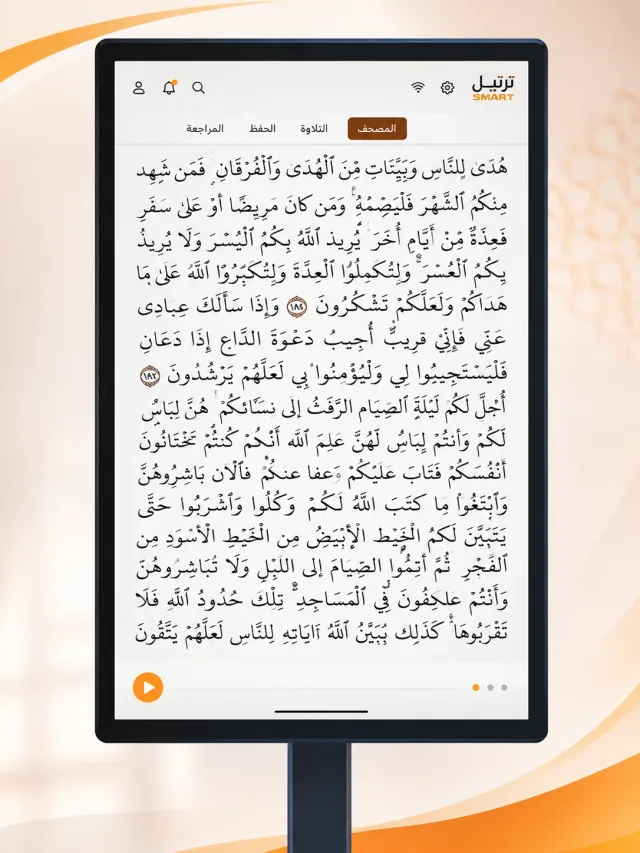
Read your way
A paper-like Mushaf view, with single or double pages, zoom, night mode, Tajweed highlighting and verse interaction.
Read, listen and explore on your phone or a large educational touchscreen. Choose a Mushaf, save your reading position and continue in Arabic or English.
Ask which model and accessories are available before ordering.Tarteel interactive screen
Explore the Quran Hub and Services interface. Select a screenshot to enlarge it.
 The app on a phone
Mushaf, recitation, Tafsir and Quranic meanings.
Services and prayer information; the times and location shown are examples in the screenshot.
The splash screen and app identity.
Choose Mushaf in the Quran Hub to reach your reading space.
Choose reading or listening, then set your preferred display and recitation options.
Use memorisation and revision tools, repeat verses and return to your saved reading position.
A paper-like Mushaf view, with single or double pages, zoom, night mode, Tajweed highlighting and verse interaction.
Multiple reciters, playback from a selected verse and verse repetition. Download available recitations for offline listening.
Five Arabic Tafsir sources and translations of Quranic meanings in six languages, with search, surah and juz navigation and bookmarks.
Multiple accounts on one device and a guest mode, with individual preferences, reading position and progress.
Personal statistics and cloud synchronisation, alongside memorisation and revision tools.
Prayer times and notifications, with Arabic and English layouts for phones and large screens. Selected functions work offline after content is prepared.
Offline content must be downloaded or prepared in advance.
These are device functions; the app options appear above. Screen size and accessories must be confirmed for the available model before ordering.
Five device demonstrations, without assigning an unverified model. Video content loads only when you choose to play.
A demonstration from Doroub Al Marefa.
Ask which model and accessories are available before ordering.